AI agents are already shopping for your customers. Is your Shopify store ready?

Your no-nonsense guide to future proofing your Shopify store with AI ready tips.
Building a successful Shopify store is all about staying one step ahead of the curve. While the big players are spending millions on custom AI, savvy small-to-medium business owners are winning by mastering the basics of the 'Agentic Era.' It’s about making your store discoverable, readable, and ready for the next wave of shoppers.
Ready to level up? You’re in the right place. We’ve put together a no-nonsense guide to help you bridge the gap between your products and the AI tools your customers are using every day. With these quick and easy tips, you’ll be able to control the information shown in LLMs like Google Gemini or ChatGPT answers and results, increasing your chances of showing to your target audience.
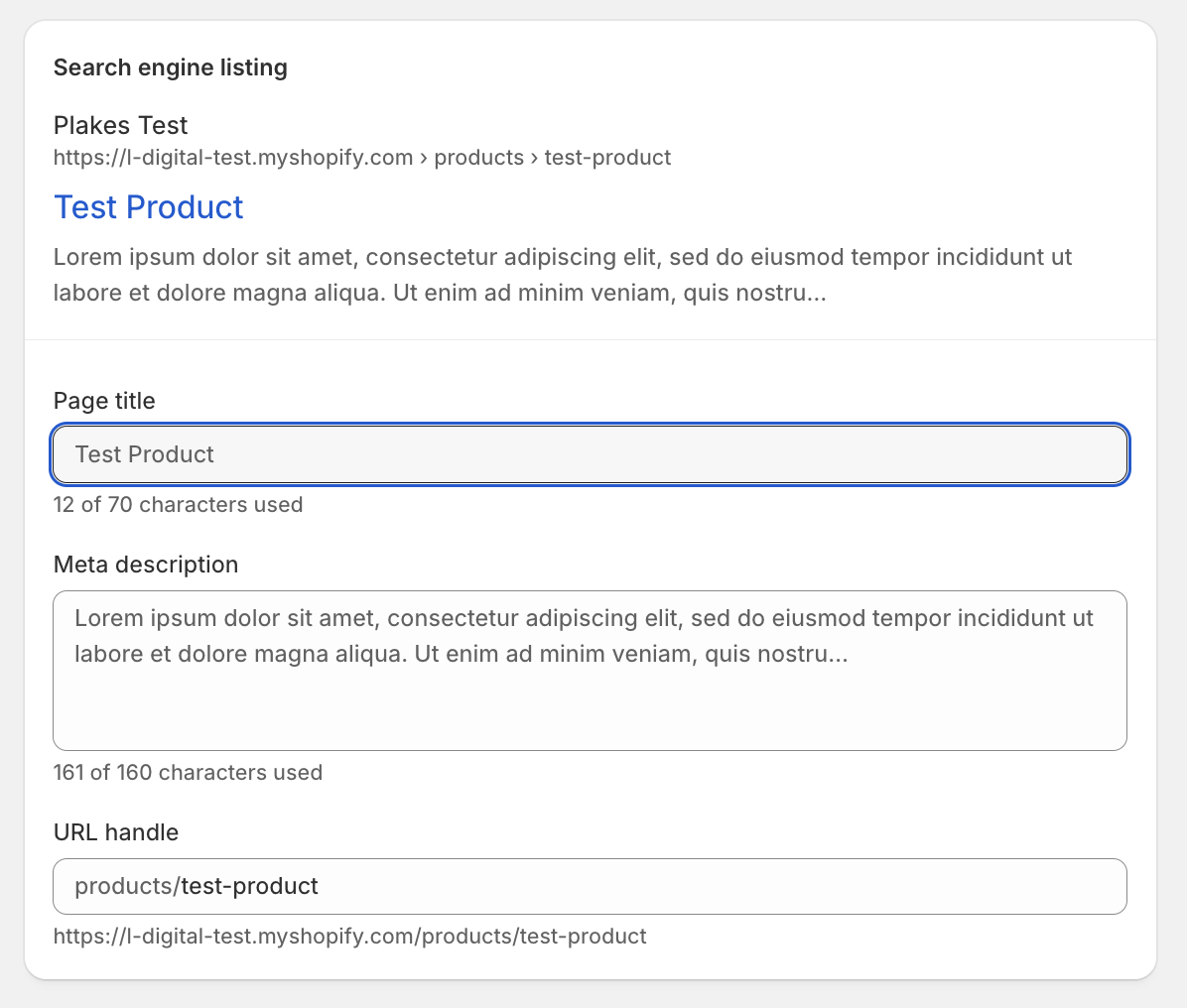
Think of Meta Titles and Meta Descriptions as your store’s "digital billboard" on a search results page. The Meta Title is the bold, clickable headline that tells search engines and shoppers exactly what the page is about, while the Meta Description is the short summary underneath that "sells" the click by explaining why your product is the best solution for their search.
Shopify is great at "guessing" your meta information by pulling your product title and a snippet of the description. Don't let it. Defaults are often clunky and lack the "semantic signals" AI models look for.
How to do it right:
An llms.txt file is a plain-text file that provides a brief, high-level summary of your store specifically for AI crawlers. It helps them digest your site without getting lost in the code.
Use ChatGPT to Draft Your llms.txt
Instead of staring at a blank screen, let ChatGPT write the content for you. Since llms.txt uses a specific Markdown format (using # for headings and > for summaries), you can give ChatGPT a simple prompt to get a perfectly formatted file.
Try this prompt:
"I am a Shopify store owner selling [Your Product Type, e.g., handmade ceramic mugs]. Here is my 'About Us' text and a list of my main collections: [Paste your text/links]. Please write a professional llms.txt file in Markdown format that summarizes my brand mission, lists my key categories, and provides a clear guide for AI agents to understand my store."
What to look for in the output:
How to add it to Shopify:
llms.txt.llms.txt file.yourstore.com/llms.txt). Since Shopify doesn't let you drop files in the root easily, you should go to Settings > Domains > Navigation and create a URL Redirect from /llms.txt to the CDN link of the asset you just uploaded.

The App Store is your secret weapon, but in 2026, you have to be picky. Don't bloat your site with 50 plugins that slow down your load speed (AI hates slow sites!).
What to look for:
If meta tags are the "headline," Schema is the "DNA." It’s hidden code that tells a search engine exactly what a price is, what the stock levels are, and how many stars your reviews have.
Plugin Recommendation: JSON-LD for SEOWhile there are many, you want a plugin that handles JSON-LD Schema.
Master these, and you aren't just running a shop.. You're running the smartest store on the digital block.
Go well!